JUCE Basics Part-2
Introduction
Now we are going to modify our current project to be a plugin project. The first thing we need to do is to change the project type. To do that, open the Projucer and select the project you want to change, then go to the project tab and change the project type to "Audio Plug-in".
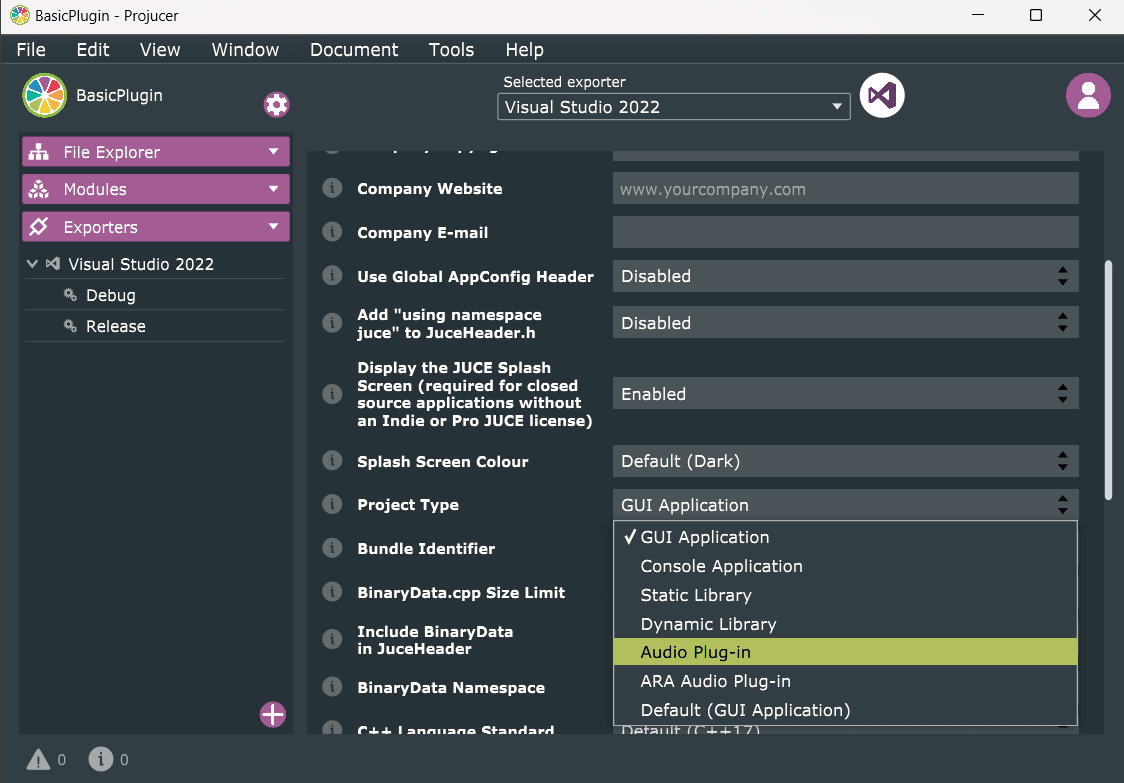
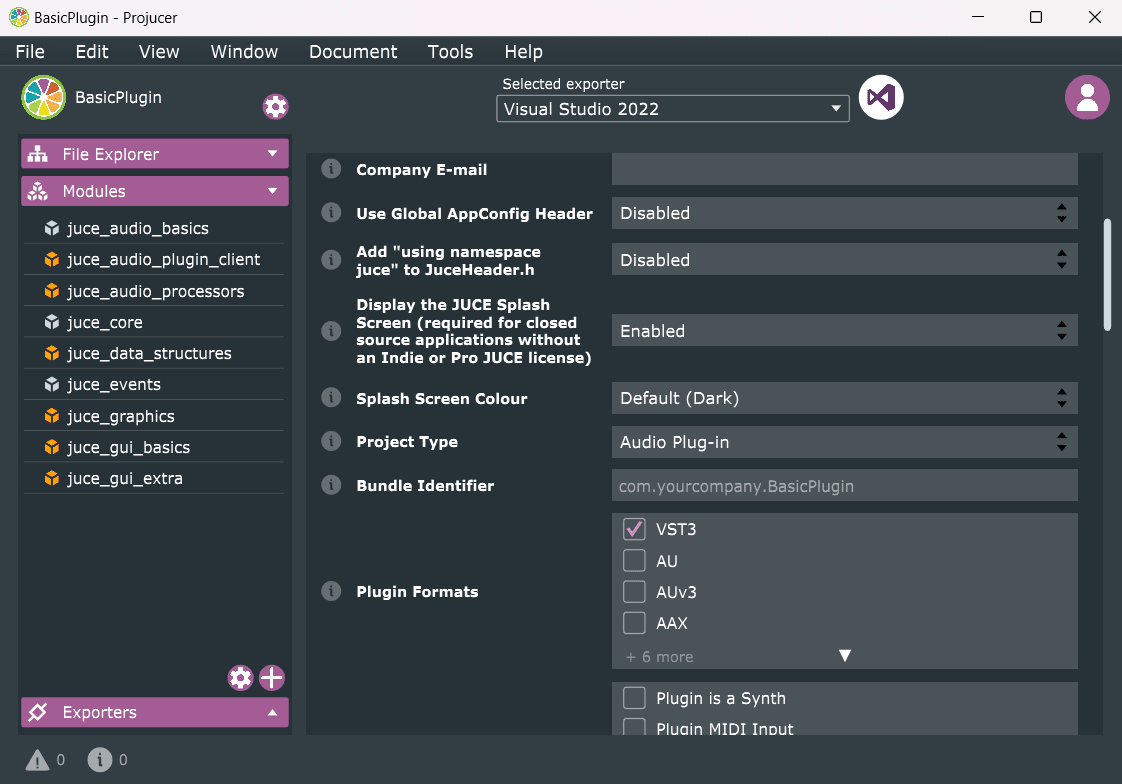
Then we need to add some JUCE modules to our project. Go to the modules tab and add juce_audio_plugin_client and will request its dependencies ('juce_audio_basics', 'juce_audio_processors', 'juce_gui_extra'). Select the plugin format you want to use.I will use VST3.
Compiling the project
If you try to compile the project now, you will get some linking errors. To be able to create a plugin instance, we need to inherit from the AudioProcessor class and call the createPluginFilter() method. We can just add the createPluginFilter() method returning nullptr in our Main.cpp file, and the compilation will be successful, but I don't encourage you to instantiate the plugin. If you get another linking errors, should be straightforward to fix them.
// ...
    private:
    std::unique_ptr<MainWindow> myWindow = nullptr;
};

START_JUCE_APPLICATION(App)

juce::AudioProcessor* JUCE_CALLTYPE createPluginFilter()
{
    return nullptr;
}
Let's change the base class of our App class. We will inherit from AudioProcessor instead of JUCEApplicationBase.
class App : juce::AudioProcessor
{
public:


private:
    std::unique_ptr<MainWindow> myWindow = nullptr;
};
And implement all the pure virtual methods from the AudioProcessor class.
class App : public juce::AudioProcessor
{
public:
    App() {}

    ~App() override {}

    const juce::String getName() const override
    {
        return {};
    }

    bool acceptsMidi() const override
    {
        return false;
    }

    bool producesMidi() const override
    {
        return false;
    }

    bool isMidiEffect() const override
    {
        return false;
    }

    double getTailLengthSeconds() const override
    {
        return 0.0;
    }

    int getNumPrograms() override
    {
        return 0;
    }

    int getCurrentProgram() override
    {
        return 0;
    }

    void setCurrentProgram(int index) override
    {

    }

    const juce::String getProgramName(int index) override
    {
        return {};
    }

    void changeProgramName(int index, const juce::String& newName) override
    {

    }

    void prepareToPlay(double sampleRate, int samplesPerBlock) override {}

    void releaseResources() override {}

    bool isBusesLayoutSupported(const BusesLayout& layouts) const override
    {
        return true;
	}

    void processBlock(juce::AudioBuffer<float>& buffer, juce::MidiBuffer& midiMessages) override {}

    juce::AudioProcessorEditor* createEditor() override
    {
		return nullptr;
	}

    bool hasEditor() const override
    {
		return false;
	}

    void getStateInformation(juce::MemoryBlock& destData) override {}

    void setStateInformation(const void* data, int sizeInBytes) override {}

private:
    std::unique_ptr<MainWindow> myWindow = nullptr;

    JUCE_DECLARE_NON_COPYABLE_WITH_LEAK_DETECTOR(App)
};
Now we can allocate our plugin instance in the createPluginFilter() method.
juce::AudioProcessor* JUCE_CALLTYPE createPluginFilter()
{
    return new App();
}
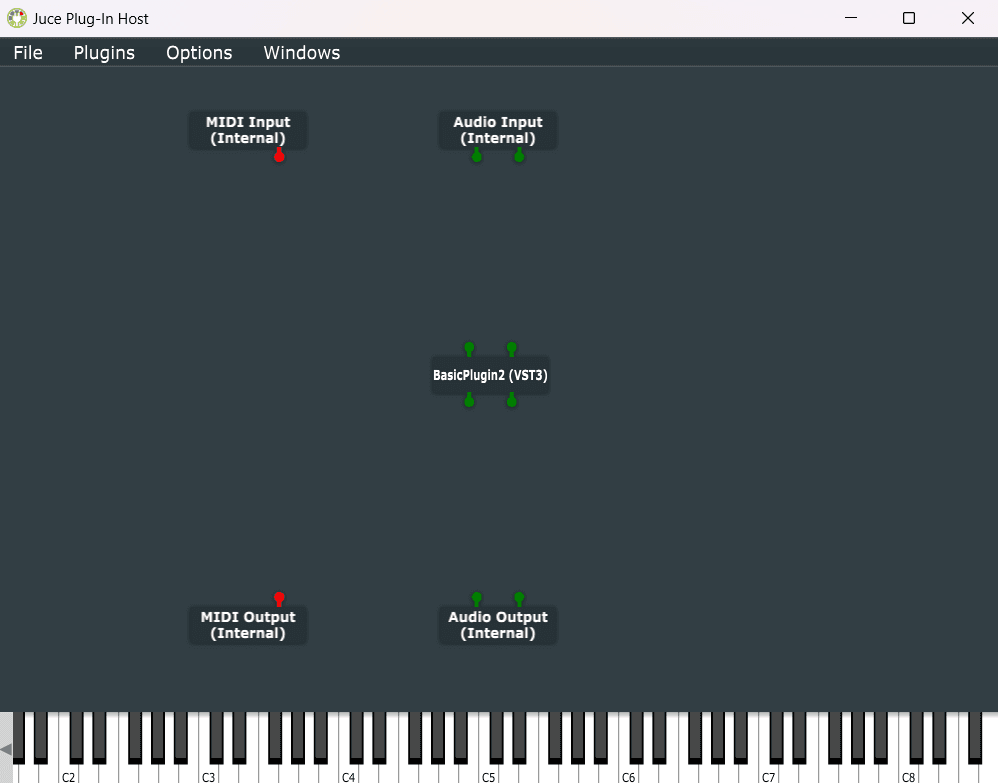
Compile the project, and instantiate the plugin in your host, I will use the Audio Plugin Host from JUCE.
Warning!!!: If you are using the Audio Plugin Host from JUCE, it's crucial to use headphones to prevent potential feedback loops that could damage your ears and speakers.
The plugin editor
Our plugin is working, but we can't see anything. We need to adapt our component to be a plugin editor. Let's get rid of the MainWindow class and the std::unique_ptr<MainWindow> myWindow = nullptr; from the App class.
We can use a generic editor to our plugin that JUCE provides. This is especially useful when we are working on the DSP algorithm and don't want to waste time creating a GUI.
juce::AudioProcessorEditor* createEditor() override
{
    return new juce::GenericAudioProcessorEditor(*this);
}

bool hasEditor() const override
{
    return true;
}
We could continue using one CPP file for our project, but separating it into header and source files provide modularity, compilation efficiency, encapsulation, and other benefits. Also to reuse our component will be easier. 'Add a New CPP & Header file ...' to the project right-clicking on the Source folder in Projucer, I will name it "MyProcessor". The header will contain only the declaration of the class, and the source file will contain the implementation. The '.h':
#pragma once
#include <JuceHeader.h>
#include "MyComponent.h"


class App : public juce::AudioProcessor
{
public:
  App();

  ~App() override;

  const juce::String getName() const override;

  bool acceptsMidi() const override;

  bool producesMidi() const override;

  bool isMidiEffect() const override;

  double getTailLengthSeconds() const override;

  int getNumPrograms() override;

  int getCurrentProgram() override;

  void setCurrentProgram(int index) override;

  const juce::String getProgramName(int index) override;

  void changeProgramName(int index, const juce::String& newName);

  void prepareToPlay(double sampleRate, int samplesPerBlock) override;

  void releaseResources() override;

  bool isBusesLayoutSupported(const BusesLayout& layouts) const override;

  void processBlock(juce::AudioBuffer<float>& buffer, juce::MidiBuffer& midiMessages) override;

  juce::AudioProcessorEditor* createEditor() override;

  bool hasEditor() const override;

  void getStateInformation(juce::MemoryBlock& destData) override;

  void setStateInformation(const void* data, int sizeInBytes) override;

private:
  JUCE_DECLARE_NON_COPYABLE_WITH_LEAK_DETECTOR(App)
};
The '.cpp':
#include <JuceHeader.h>
#include "MyProcessor.h"
#include "MyComponent.h"


App::App() {}

App::~App()  {}

const juce::String App::getName() const
{
  return {};
}

bool App::acceptsMidi() const
{
  return false;
}

bool App::producesMidi() const
{
  return false;
}

bool App::isMidiEffect() const
{
  return false;
}

double App::getTailLengthSeconds() const
{
  return 0.0;
}

int App::getNumPrograms()
{
  return 0;
}

int App::getCurrentProgram()
{
  return 0;
}

void App::setCurrentProgram(int index)
{

}

const juce::String App::getProgramName(int index)
{
  return {};
}

void App::changeProgramName(int index, const juce::String& newName)
{

}

void App::prepareToPlay(double sampleRate, int samplesPerBlock)  {}

void App::releaseResources()  {}

bool App::isBusesLayoutSupported(const BusesLayout& layouts) const
{
  return true;
}

void App::processBlock(juce::AudioBuffer<float>& buffer, juce::MidiBuffer& midiMessages)  {}

juce::AudioProcessorEditor* App::createEditor()
{
  return new juce::GenericAudioProcessorEditor(*this);
}

bool App::hasEditor() const
{
  return true;
}

void App::getStateInformation(juce::MemoryBlock& destData)  {}

void App::setStateInformation(const void* data, int sizeInBytes)  {}


juce::AudioProcessor* JUCE_CALLTYPE createPluginFilter()
{
  return new App();
}
Delete the Main.cpp file, and compile the project.
Next in MyComponent.h, we need to inherit from AudioProcessorEditor instead of Component. The AudioProcessorEditor is a subclass of Component, (AudioProcessorEditor Class Reference) they differ in that the AudioProcessorEditor has a pointer to an AudioProcessor, and the Component doesn't. We need to pass the AudioProcessor reference in the constructor of the MyComponent class.
#pragma once

#include <JuceHeader.h>
#include "MyProcessor.h"

class MyComponent  : public juce::AudioProcessorEditor
{
public:
    MyComponent(App&);
    ~MyComponent() override;

    void paint (juce::Graphics&) override;
    void resized() override;

private:
    juce::String myText;

    App& appProcessor;

    JUCE_DECLARE_NON_COPYABLE_WITH_LEAK_DETECTOR (MyComponent)
};
In the constructor of the MyComponent class, we must initialize the AudioProcessorEditor with the AudioProcessor reference and set the size of the component.
MyComponent::MyComponent(App& p) : myText("Hello World!"), AudioProcessorEditor(&p), appProcessor(p)
{
    setSize(300, 200);
}
In the MyProcessor.cpp file, we change the GenericAudioProcessorEditor to MyComponent.
juce::AudioProcessorEditor* App::createEditor()
{
    return new MyComponent(*this);
}
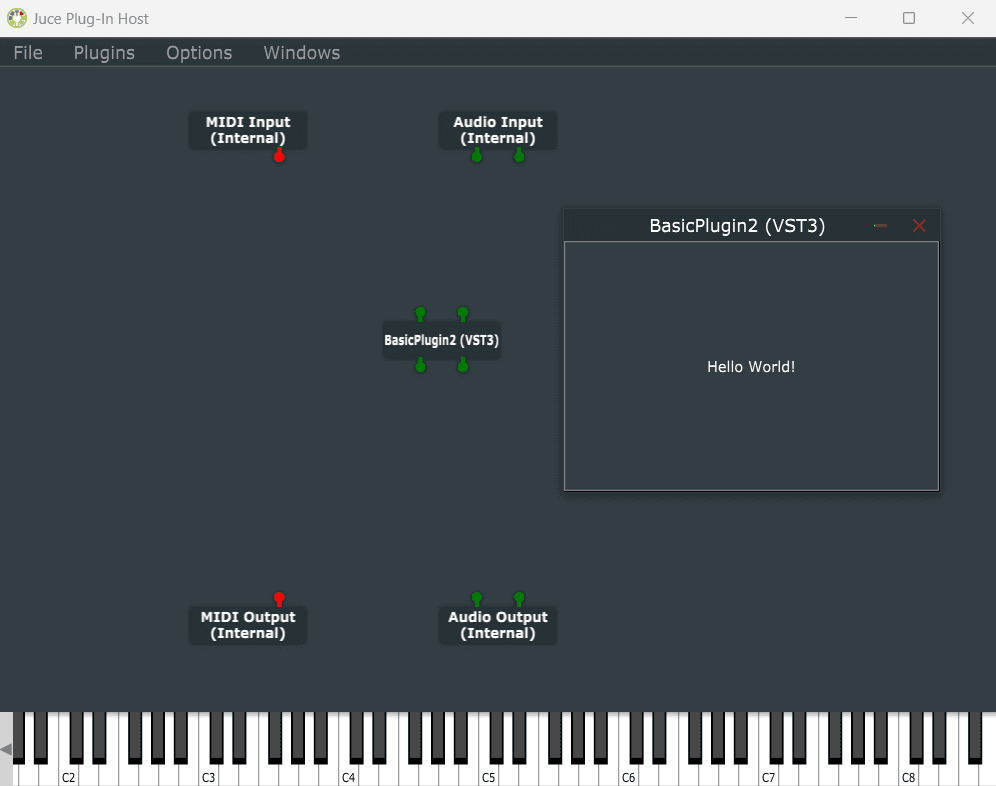
After compilation and instantiation of the plugin in the host, we can see our component.
Conclusion
We can see our that our project structure is similar to the JUCE Audio Plugin template. All we did until now is important to understand a bit of the JUCE framework and how to create a plugin with it. In the next tutorial we will create a simple way to visualize the audio buffers.